
Happy holidays everyone, this is Programmer Wanfeng. Same name on Xiaohongshu.
Today I'm sharing a practical feature: Auto send group greeting messages.
I believe working adults have all experienced the helplessness of sending group holiday greetings. Today I'm sharing a tool that can quickly solve this problem.
Let's take a look at how to use it~
Download and Installation
The auto group-send feature comes from a Python third-party library: python-office. Use the following command to download and install it for free:
(If you haven't installed Python yet, check my profile for a free Python installation tutorial~)
1 | pip install python-office |
For friends in China, it's recommended to use the Tsinghua mirror for installation:
1 | pip install python-office -i https://mirrors.aliyun.com/pypi/simple/ -U |
1 Line of Code, Auto Group Send
After downloading, run the following code to implement auto group sending:
1 | import office |
After running this command, a loading page will appear as shown below. 👇
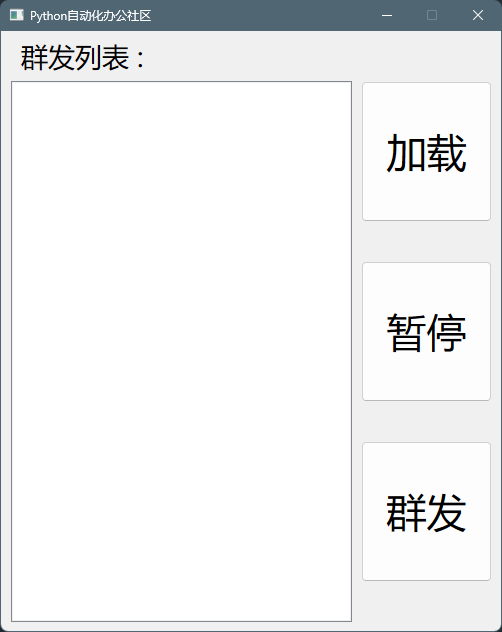
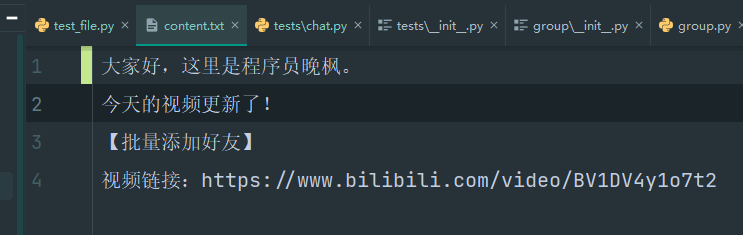
You can fill in 2 things:
- The content you want to send to groups. For example: Happy holidays from Programmer Wanfeng.
- Who you want to send to. You can specify individuals or group chats simultaneously, no limit on number.

Final Thoughts
This feature can not only be used for sending holiday greetings, but also for sending any messages you need to groups. For example: group advertising.
Although I don't recommend sending advertisements to bother people, the functionality does exist.
If you have any questions using the code, feel free to exchange ideas with me in the comments section~
Related Reading
Programmer Wanfeng focuses on AI programming training. Beginners can start making AI projects after watching his tutorial 《30 Lessons · AI Programming Training Camp》 co-produced with Turing Community.
🎓 AI 编程实战课程
想系统学习 AI 编程?程序员晚枫的 AI 编程实战课 帮你从零上手!
- 👉 免费试看:网盘链接,免费试看前3讲,先看看适不适合自己
- 👉 - 👉 课程报名:点击这里报名,现在报名还送书📖
 微信进群
微信进群